> ## Documentation Index
> Fetch the complete documentation index at: https://nango-tiktok-accounts-update.mintlify.site/llms.txt
> Use this file to discover all available pages before exploring further.
# Field Mapping
> Synchronize user-specific data using custom fields.
## When should you use field mappings?
Field mappings enable you to synchronize data stored in custom fields tailored to individual users. This is useful when your customers store information in custom-defined fields, and you need to sync that data to fields within your product. The solution? Offer a user interface where customers can map their custom field names to the standardized field names used by your product. Once this mapping is defined, Nango facilitates the data synchronization through [syncs](/guides/sync) and [actions](/guides/action).
## How can field mappings be implemented in Nango?
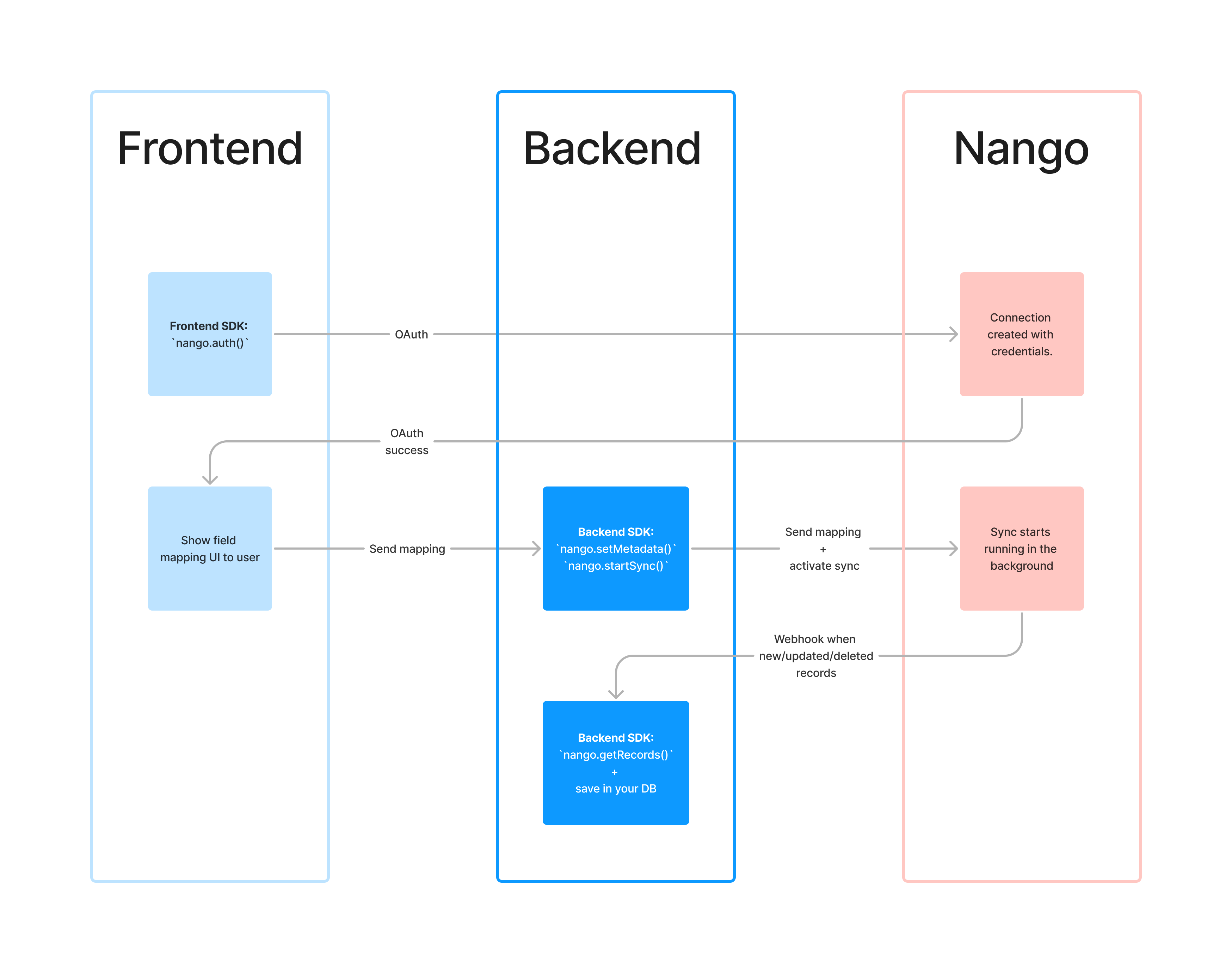
Nango provides dedicated tools to support field mappings of any complexity. Here's a step-by-step approach to leverage this capability:
1. Set up your *sync* so it doesn't initiate automatically upon creating a new connection (cf. [*sync* initial state](/guides/field-mapping#sync-initial-state)).
2. Gather field mappings from your user and store them in the connection [metadata](/guides/advanced-auth#storing-custom-metadata-per-connection).
3. Start the *sync* programmatically, either via the SDK or API. (Documentation pending)
4. Within your *sync* script, retrieve the field mappings from the [metadata](/guides/advanced-auth#storing-custom-metadata-per-connection) to access the custom fields specified by your customer.
When collecting field mappings, you may want to display the available custom fields to users, fetching them directly from their external systems. For these types of one-time synchronous tasks, consider utilizing our [actions](/guides/action) feature.
 ## *Sync* initial state
By default, a *sync* initiates automatically when a new connection is established. However, if the *sync* needs supplementary metadata, such as field mappings, before execution, it's advisable to alter this default behavior. To achieve this, set the `auto_start` field to `false` in your `nango.yaml` configuration file for the specific sync:
```yaml nango.yaml
integrations:
asana-dev:
asana-tasks:
runs: every 30min
auto_start: false # Defaults to true.
returns:
- AsanaTask
...
```
## *Sync* initial state
By default, a *sync* initiates automatically when a new connection is established. However, if the *sync* needs supplementary metadata, such as field mappings, before execution, it's advisable to alter this default behavior. To achieve this, set the `auto_start` field to `false` in your `nango.yaml` configuration file for the specific sync:
```yaml nango.yaml
integrations:
asana-dev:
asana-tasks:
runs: every 30min
auto_start: false # Defaults to true.
returns:
- AsanaTask
...
```