> ## Documentation Index
> Fetch the complete documentation index at: https://nango-tiktok-accounts-update.mintlify.site/llms.txt
> Use this file to discover all available pages before exploring further.
# Synchronize Data
> Continuously sync data from external APIs.
## When should you use *syncs*?
*Syncs* enable to continuously sync data between your app and external APIs. Use them to:
* keep a list of records in sync between your app and an external system
* take action when records from an external system are created, updated and/or deleted
*Syncs* handle:
* Efficient API requests and data transformations.
* Unified data schemas across diverse external APIs.
* Advanced job orchestration through the dashboard & API.
* Automated rate-limit handling and retries.
* Built-in pagination.
* Data integrity, deduplication, and change detection.
* Comprehensive logging and monitoring.
# Step 0: API authorization
Start by ensuring the external API you intend to work with is authorized. If not, refer to the [Authorize APIs guide](/guides/oauth) for guidance.
# Step 1: Activate a pre-built *sync*
Go to the [Syncs & Actions tab](https://app.nango.dev/syncs) and click the `Add New` button.
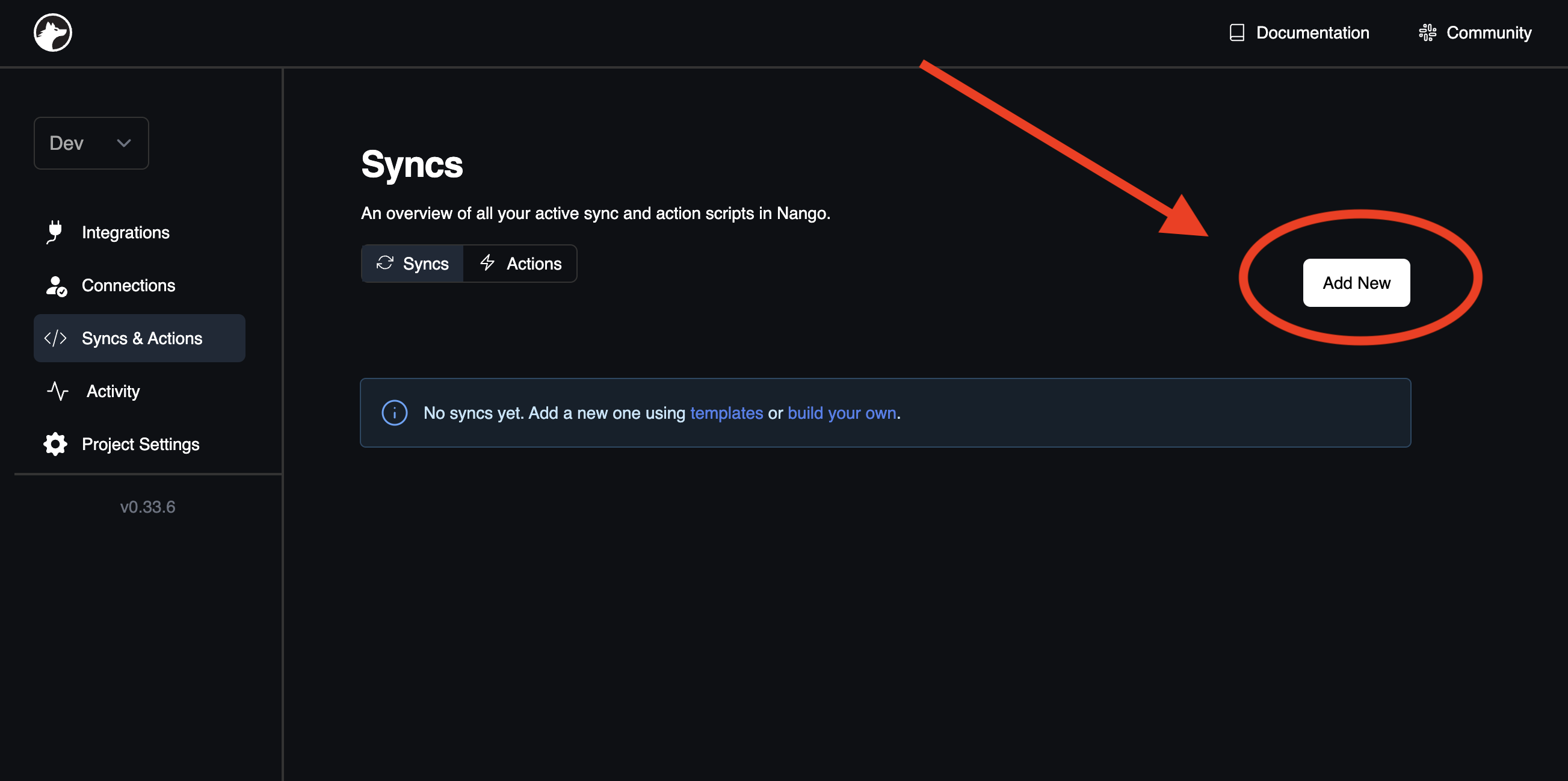 From the `Provider` dropdown, select the desired API. In the `Template` dropdown, pick the *sync* that correspond to the object(s) you want to synchronize. Click `Add Sync` at the page's bottom.
Fantastic! Nango will now automatically sync these objects in the background.
# Step 2: Fetch the synced data
Fetch the synced data
Transition to the [Project Settings tab](https://app.nango.dev/project-settings) to obtain the secret key essential for fetching the synced data:
From the `Provider` dropdown, select the desired API. In the `Template` dropdown, pick the *sync* that correspond to the object(s) you want to synchronize. Click `Add Sync` at the page's bottom.
Fantastic! Nango will now automatically sync these objects in the background.
# Step 2: Fetch the synced data
Fetch the synced data
Transition to the [Project Settings tab](https://app.nango.dev/project-settings) to obtain the secret key essential for fetching the synced data:
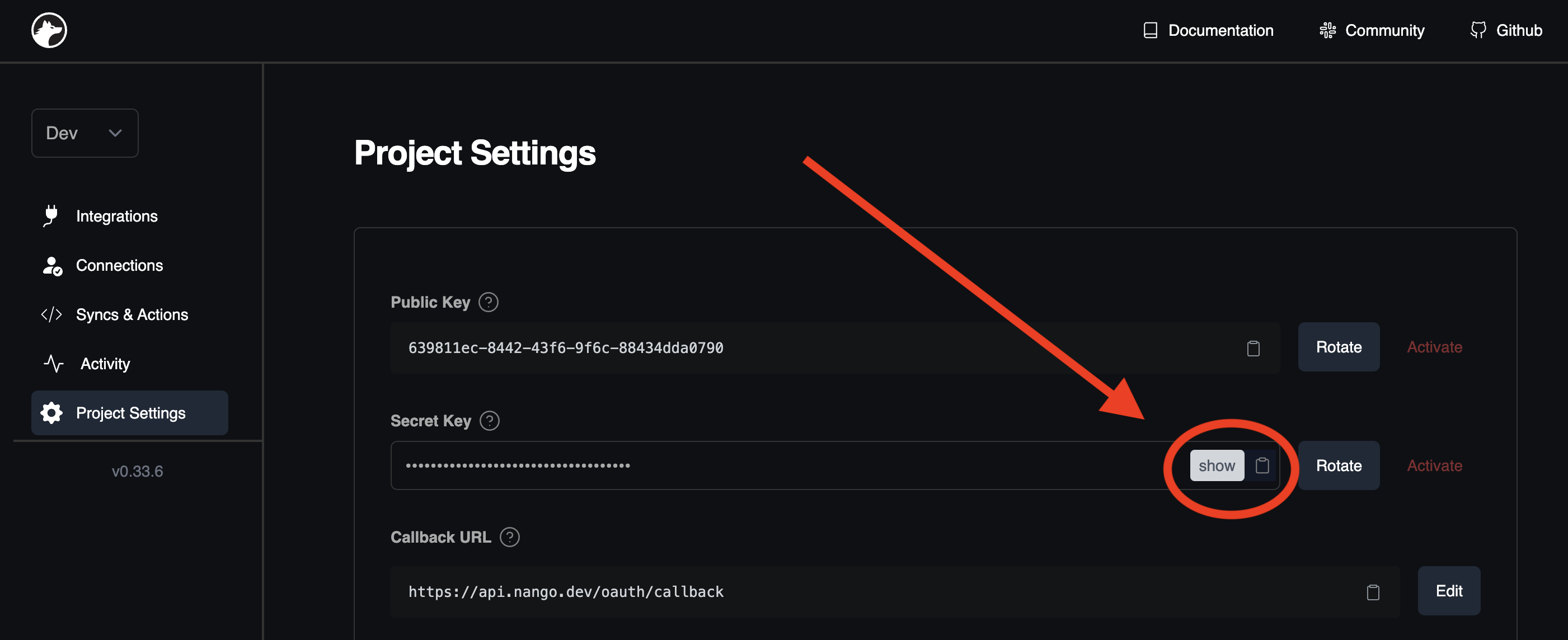 Now, collect the continually updated data:
```bash
curl --request GET \
--url 'https://api.nango.dev/records?model=' \
--header 'Authorization: Bearer ' \
--header 'Connection-Id: ' \
--header 'Provider-Config-Key: '
```
```ts
import { Nango } from '@nangohq/node';
const nango = new Nango({ secretKey: '' });
const result = await nango.listRecords({
providerConfigKey: '',
connectionId: '',
model: ''
});
```
Nango also sends [webhooks](/guides/webhooks) whenever new/updated/deleted records are detected. That's it 🎉
## Next Steps
Dive deeper with the [Customize Syncs & Actions guide](/guides/custom). Explore the [Field Mapping guide](/guides/field-mapping) or the [Webhooks guide](/guides/webhooks).
## Questions, problems, feedback?
We're here to help! Please reach out on the [Slack community](https://nango.dev/slack), we are very active there.
Now, collect the continually updated data:
```bash
curl --request GET \
--url 'https://api.nango.dev/records?model=' \
--header 'Authorization: Bearer ' \
--header 'Connection-Id: ' \
--header 'Provider-Config-Key: '
```
```ts
import { Nango } from '@nangohq/node';
const nango = new Nango({ secretKey: '' });
const result = await nango.listRecords({
providerConfigKey: '',
connectionId: '',
model: ''
});
```
Nango also sends [webhooks](/guides/webhooks) whenever new/updated/deleted records are detected. That's it 🎉
## Next Steps
Dive deeper with the [Customize Syncs & Actions guide](/guides/custom). Explore the [Field Mapping guide](/guides/field-mapping) or the [Webhooks guide](/guides/webhooks).
## Questions, problems, feedback?
We're here to help! Please reach out on the [Slack community](https://nango.dev/slack), we are very active there.