

When should you use field mappings?
Field mappings enable you to synchronize data stored in custom fields tailored to individual users. This is useful when your customers store information in custom-defined fields, and you need to sync that data to fields within your product. The solution? Offer a user interface where customers can map their custom field names to the standardized field names used by your product. Once this mapping is defined, Nango facilitates the data synchronization through syncs and actions.How can field mappings be implemented in Nango?
Nango provides dedicated tools to support field mappings of any complexity. Here’s a step-by-step approach to leverage this capability:- Set up your sync so it doesn’t initiate automatically upon creating a new connection (cf. sync initial state).
- Gather field mappings from your user and store them in the connection metadata.
- Start the sync programmatically, either via the SDK or API. (Documentation pending)
- Within your sync script, retrieve the field mappings from the metadata to access the custom fields specified by your customer.
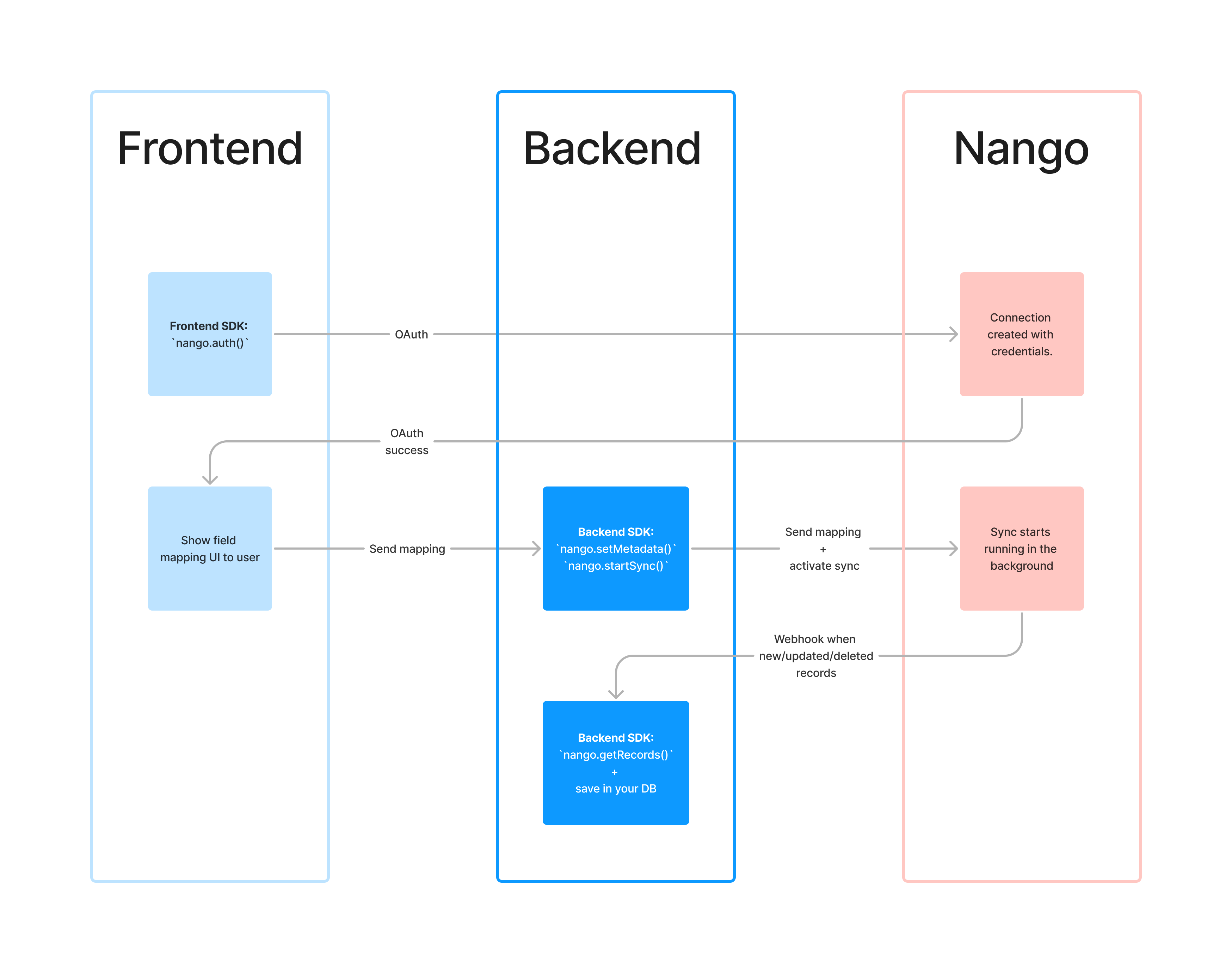
Field mapping flow in Nango
Sync initial state
By default, a sync initiates automatically when a new connection is established. However, if the sync needs supplementary metadata, such as field mappings, before execution, it’s advisable to alter this default behavior. To achieve this, set theauto_start field to false in your nango.yaml configuration file for the specific sync:
nango.yaml